

For the past few years, a big part of my life has been the WordPress community in Islamabad. When we started the local WordPress Community, we also created a WhatsApp group for developers and learners so they could ask questions, share problems, and help each other.
Very quickly, I started to notice a pattern.
The Same Problems Kept Coming Up
Almost every week, I would see messages like:
- “My website is very slow, what should I do?”
- “My site got hacked again.”
- “Which hosting provider should I move to? I’m not happy with my current one.”
Most of these friends were using traditional shared hosting with cPanel. For many of them, performance was inconsistent, security was a constant worry, and they felt stuck — especially when they didn’t fully understand what was happening on the server side.
My Usual Advice: Try AWS and Take Control
Because of my background in system administration and DevOps, my suggestion was often:
“Why not try AWS? Create your own VM (server), configure it properly, and use it only for your websites.”
This approach has many advantages:
- Dedicated resources – You know that all CPU, RAM, and disk are dedicated to your websites only.
- Scalability – You can scale up or down based on your needs.
- Cost control – You can even shut down the VM when it’s not needed for a few days and avoid paying for compute during that time.
I also strongly recommended using Git-based deployment instead of old-fashioned FTP/SFTP. With FTP/SFTP, there is always a risk that a compromised laptop uploads malware to the server along with the code. Git is more secure, more traceable, and makes rollbacks much easier.
The Problem: “We Don’t Know How to Do That”
The answer I heard most of the time was very similar:
- “We don’t know how to manage a server on AWS.”
- “We don’t know how to install and maintain services.”
- “We don’t know how to use Git properly.”
- “We’re used to cPanel. It’s easier for us.”
And honestly, they were right.
Not everyone wants to become a DevOps engineer just to host a few websites. People want a simple interface where they click a few buttons and things “just work,” while still getting the benefits of modern infrastructure like AWS.
That’s when the idea for Zeeta Cloud really started to form in my mind.
The Idea: A cPanel-Like Experience, but Modern and Cloud-Native
I asked myself:
“What if I create something that feels familiar like cPanel/WHM,
but is built for AWS, performance, and security from day one?”
So the concept became:
- A server management panel (like WHM)
- To manage AWS servers, user accounts, services, and configurations.
- A website management panel (like cPanel)
- To manage websites, email accounts, databases, DNS, etc.
But under the hood, it would use modern DevOps practices:
- Infrastructure as Code
- Git-based deployments
- Automated security checks
- Smart caching and performance optimizations
That’s how Zeeta Cloud was born.
Building Zeeta Cloud: A Year of Challenges and Learning
About a year ago, I started building Zeeta Cloud seriously.
It hasn’t been a straight or easy path. I faced many challenges around:
- Automating server provisioning and configuration
- Integrating CI/CD in a way that’s simple for non-technical users
- Handling backups, restores, and security in a reliable way
- Making the interface easy to use, even for those who are not DevOps people
Each challenge took time, research, and experimentation to solve. (I’ll write separate posts in the future about the technical challenges and how I solved them.)
But today, I’m happy to say:
Zeeta Cloud is finally in good shape and ready for launch.
What Zeeta Cloud Does for You
Zeeta Cloud is designed to give you everything you’d normally expect from a DevOps engineer and a hosting control panel – but in one simple, friendly interface.
On the server & infrastructure side
With Zeeta Cloud, you don’t have to worry about manual server setup or low-level configuration. It takes care of:
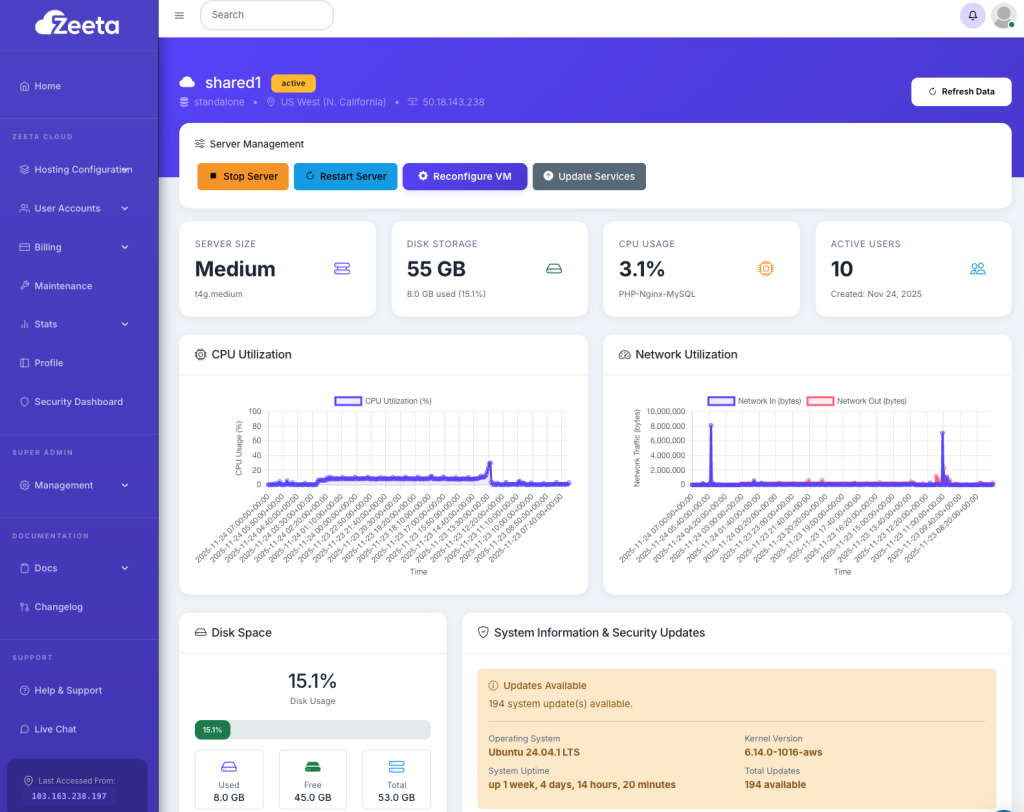
- Automated server provisioning
Create optimized servers on AWS with secure defaults, isolated networking, and the right services pre-installed. - Scale up or down as you need
Upgrade to a bigger VM when traffic grows, scale down when it’s quiet, or even turn off servers you don’t need to control costs. - Bring your own cloud
Use your own AWS account so you stay in full control of your infrastructure and billing, while Zeeta handles the technical side. - Cost reports inside the Zeeta dashboard
See estimated AWS costs directly inside Zeeta Cloud instead of getting lost in the AWS console. - Resource monitoring
Keep an eye on CPU, RAM, and other key metrics so you always know how your servers are performing.
On the website & application side
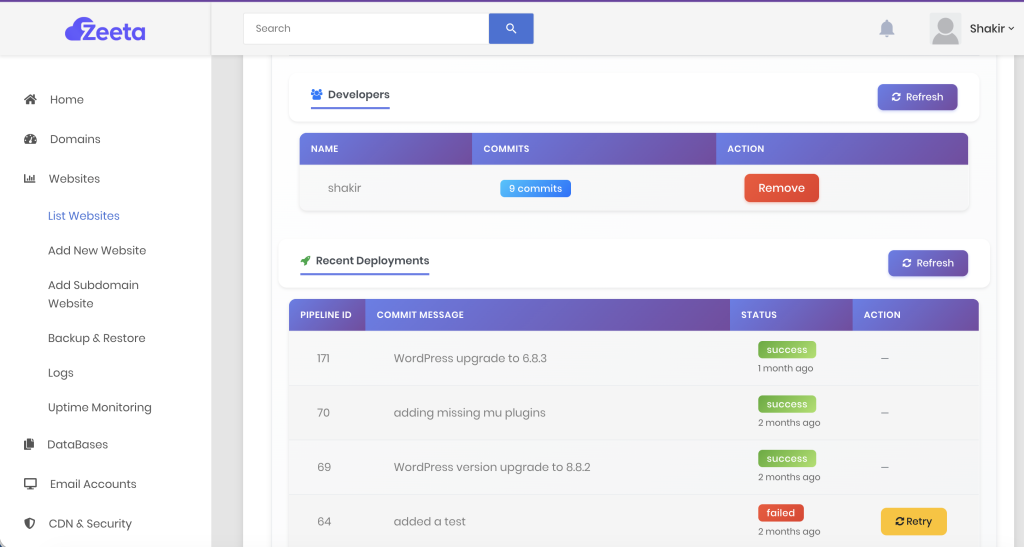
Once your server is ready, Zeeta Cloud takes care of the website layer too:
- 1-Click installs
Launch WordPress, Drupal, or a generic PHP application with a single click. - Secure Git-based deployments
No FTP/SFTP. Add as many developers as you want to your project, give them Git-based deployment access, and keep everything traceable and secure. - Built-in CI/CD safety checks
Every deployment goes through:- Virus scanning
- PHP syntax checks
before it reaches your live server.
- Uptime & latency monitoring
Track whether your website is up and how fast it’s responding, so you know when something needs attention. - Logs & analytics
Access logs and basic analytics from a central place – helpful for debugging and performance tuning. - Automated object caching
Smart caching is configured for you, improving performance without manual tweaks. - Media offloading to S3
Heavy media files are offloaded to S3, reducing server load, increasing reliability, and helping with costs. - CDN integration
Connect to a CDN for faster page loads globally, better caching, and extra protection at the edge. - Email accounts management
Create and manage email accounts for your domains from the same panel. - Domain & DNS management
Register domains, manage existing domains, and handle DNS records (A, CNAME, MX, TXT, etc.) directly from Zeeta Cloud. - Secure database backups & restore
Backup and restore your databases in a safe, controlled way, so you always have a recovery path.
In short: Zeeta Cloud brings together server management, website management, performance, security, and DevOps best practices – all in one place.
Packages That Fit the Way You Work
Different teams have different comfort levels with cloud and billing, so Zeeta Cloud is built to be flexible.
1. Bring Your Own Cloud (Recommended if you want full control)
You connect your own AWS account, and Zeeta Cloud sits on top of it as your control panel.
- You own the AWS account and billing with Amazon directly.
- Zeeta handles:
- Server provisioning
- Service installation
- Website setup and deployment
- Monitoring, backups, and more
This is ideal if you want transparency and long-term control over your infrastructure.
2. Use Our AWS Account
If you don’t want to touch AWS at all, you can simply use our AWS account and let us manage everything behind the scenes. In this model, you pay Zeeta Cloud directly, and we handle the AWS side.
Within this, you’ll have options like:
- Shared hosting style
- Multiple websites sharing a server
- Good for smaller projects, testing, or low-traffic sites
- Dedicated VM (small or large) – Most recommended
- Your own virtual machine on our AWS account
- Better performance, isolation, and stability
- Suitable for agencies, growing businesses, and serious production sites
Over time, you can start small and move up to larger VMs as your traffic and requirements grow. And in future we are moving toward automated scalable Kubernetes.
Signup today or request for demo by going to Zeeta Cloud